Showing posts with label Windows XP. Show all posts

Transform Windows XP into Mac OS X

Transform Windows XP into Mac OS X

Posted by Anonymous  |  at  01:42


login-xp-mac-2
There are many ways to transform Windows XP into Mac OSX. For users who do not feel like to actually use MAC but love to have look and feel like MAC OSX for their Windows XP, this topic can help.
Following procedure is to turn XP into MAC OS X Leopard. It will not hurt your PC settings or software. Windows settings will remain same and software will work fine. This is just a transformation which changes the look and feel of you Window XP.
Easy to use transformation pack for turning your Window XP to Mac OSX is Flyakite OSX. Flyakite is freeware and is not affiliated or endorsed by Apple or its affiliates.
flyakite-1
FlyakiteOSX is a transformation pack. It will transform the look of an ordinary Windows XP+ system to resemble the look of Mac OS X. The installer simply automates the process of replacing critical system files, setting registry tweaks, and installing extras such as cursors, sounds, visual styles, etc. FlyakiteOSX DOES NOT contain any spyware or ad-ware of any kind. All files needed for FlyakiteOSX are stored in the Windows directory in a folder named ‘FlyakiteOSX’ that is hidden by default. All registry values for FlyakiteOSX are written to HKEY_LOCAL_MACHINESoftwareFlyakiteOSX.
Transformation Using Flyakite OSX
  • Download Flyakite OSX
  • Double click the downloaded file to install the transformation pack
  • During the installation, create a restore point (for safely switching back, if anything goes wrong)
  • Install the package
  • Restart your computer
  • Done

XP Login ScreenShot

login-xp-mac-2

XP Desktop ScreenShot

desktop-3

Transformation Using Brico Pack – LeopardXP

bricopack 
Using Brico pack-LeopardXP you can transform Windows XP into MAC. This is all in one transformation pack having everything you need for transformation. The visual transformation is full. The menu bar moves to the upper side of the screen, the start menu is substituted by the apple, window controls move to the left and are the same you use in a Mac. Yes, you’ll also have the famous Dock, a toolbar that gives you direct access to several applications and that gives a really good movement sense, in fact it is placed there by using one of the most famous pieces of software for Windows customization. Finally, the background will be changed and if anybody visits you, he will be amazed to see that you are using MAC. It happened with me. My colleague was using Ubuntu Transformation pack for XP. When I saw 3D style desktop and scrolling windows and charming visual style, I was amazed and asked him that he is using Linux. He smiled and said, Oh Yeah! Later on I realized the fact.
preview_leopard 

leopardxp-shot

Download Brico Transformation Pack – LeopardXP (40+MB)

If you do not need heavy transformation pack with 40+MB size. You can style your Windows XP with LeopardXP VS Theme.

XP Transformation Using LeopardXP VS Theme – (2.25 MB)

leopardxp_vs_1_1_by_vladimir0523
This ‘Apple OS theme’ for XP is of 2.25 MB size and it will transform your XP look, like Leopard MAC OSX. The skin is comparatively light weighed than LeopardXP Brico Pack.

Download LeopardXP VS Theme


Do It Yourself XP to MAC Transformation

Another way is to customize Windows objects and portions one by one yourself. There are many little tools available, ready to turn XP into MAC like appearance.
Following tools will help your XP transform into MAC OSX. Choose your best tools.
  • StyleXP or WindowBlinds (skins the Graphical User Interface of your operating system)
  • ObjectBar (the white Finder bar on the top of Macs; has File, Edit, View, etc. on it.)
  • ObjectDock, YzDock, or MobyDock (The dock on the bottom of a Mac that contains icons and shortcuts to programs)
  • Trillian (chat program that can be skinned to resemble iChat)
  • YzToolbar (skins the toolbar icons in your Windows windows)
  • YzShadow (puts a lovely drop shadow under your windows like in Mac OS X)
  • Rainlendar (popular skinable desktop calendar)
  • Rainmeter (skinnable desktop system statistics)
  • Samurize (can display just about anything, such as clocks, uptime, and the weather)
  • iTunes for Windows
  • Icons (Over a 1,000 icons lifted from Mac OS X 10.3 aka Panther)
Engadget has a bit detailed version about transforming XP into MAC by using these tools.

Famous MAC Wallpapers for your Desktop Background

If you just transformed Windows XP into MAC by using custom tools, then look at these amazing wallpapers just for MAC. First one is the right choice for your desktop background and you are ready to use your Windows XP powered by MAC, but only you will know it, not your friends.
starfield 
 
grass

Windows XP Pro SP3 Black Edition 2012

Windows XP Pro SP3 Black Edition 2012

Posted by Anonymous  |  at  18:13

Windows XP Professional SP3 Black Edition (February 2012)
Windows XP Pro SP3 Black Edition 2012 - Windows XP Black Edition is a modified operating system that  inside added some applications are very often required. And not only that, Windows XP SP3 Black has been equipped with a serial number that automatically when you install the operating system is already active and ready for use without requiring you to use your time to perform the activation of Windows XP Pro SP3 Black Edition.The operating system is taken from a special and original Windows XP Professional SP3 ISO. Windows XP Pro SP3 is already equipped with Codec Pack which allows you to play almost every audio and video formats with a Multimedia Player.Some applications are automatically installed :
  •     7-Zip v9.20
  •     SumatraPDF v1.9
  •     Unlocker v1.9.1
  •     Virtual CloneDrive v5.4.5.0
  •     K-Lite Mega Codec Pack v8.4.0
  •     Java SE Runtime Environment (JRE) v7 Update 3
  •     Flash Player ActiveX Control v11.1.102.62
  •     Microsoft Silverlight v5.0.61118.0
  •     Microsoft DirectX v9.29.1962
  •     Windows Internet Explorer 8
  •     Windows Media Player 11
  •     Microsoft XML v4.0 SP3 and much more
Requirement :
  • 233 MHz of processor
  • 64 MB of RAM
  • 800 x 600 screen resolution
  • Up To 5 GB free hard drive space
  • Keyboard, Mouse

SCREENSHOTS

Download and try Magic DVD Copier for free!

Repair Windows XP Without Bootable CD

Repair Windows XP Without Bootable CD

Posted by Anonymous  |  at  15:45


 REPAIR Windows XP Without Bootable CD
Many Times the registry entries or files of our system got corrupted because of viruses or other reasons, in this case for repairing windows XP we format our system or repair windows xp by some other ways like by using Bootable cd method. But through this method we can repair our windows xp without using Bootable cd or Formatting System. This Method is Called Web Folders XP Repairing System. Follow me to Repair Windows Xp:
  • Click On Start and Go to Run.
  • In Run Type webfldrs.msi
  • New Window Will Open In Your Screen Now Click On Select Reinstall Mode.
  • Again New Window Will Open In Your Screen Just Tick Marks On all the Options and Click Ok.
  • It Will Take Some Time in Repairing Your Windows XP and When the Process will be Completed it will ask to Restart your System then Just Restart your System.
Repair Windows XP Without Bootable CD
  • That's It, By Using This Method Your Windows XP will be repaired without using bootable cd or Formatting.

How to Fix windows xp corrupted file easily???

How to Fix windows xp corrupted file easily???

Posted by Anonymous  |  at  14:55


Fix windows xp corrupt
Manny time some xp files get currupted, So Today i will show you how to easily fix Windows xp corrupted files. Its work perfectly on windows xp and might works on windows 7 and windows vista also. Just follow below instruction to fix your corrupted window.
Requirements:-
• PC Running Windows xp
• Windows XP CD
Steps to do this:-
• Place Windows XP cd in your CD/DVD drive.
• Then Go to Start > Run
• Type in sfc /scannow

Fix windows xp corrupt
• Now your XP will run fine.

Royale Noir: secret XP theme (download)

Royale Noir: secret XP theme (download)

Posted by Anonymous  |  at  00:13

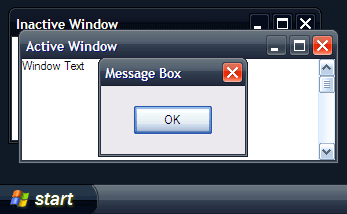
Royale Noir


Royale Noir screenshotRoyale Noir screenshotRoyale Noir screenshotRoyale Noir screenshot
Without a doubt, XP Media Center’s Royale theme was a huge improvement over Luna. It updated the cliché beveled look-and-feel if XP to a contemporary glossy style, whilst keeping similar color schemes and layouts. In my opinion, it was the most usable non-standard XP theme available.
Royale Noir is an almost exact copy of Royale except with a dark purplish tint. If Royale was day, Royale Noir is night. No doubt about it, this is a ‘dark’ theme. If you’re the sort of person who likes bright and vivid colors, stay away from this theme.
As W3bbo pointed out, there are quite definitely issues with this theme due to its incompleteness. The most obvious being, the “Start” button’s hover and active states are unchanged from Royale, inconsistent with the purple tint surrounding. However, there is even a color scheme for Office 2003 so it will not default to the blue Luna colors.
Looking at it from the big picture, Royale Noir is a welcomed alternative to the extremely small collection of verified-by-Microsoft XP themes. However being incomplete, it is not recommended for the general consumers. Enthusiasts are welcomed to try it to stand out from the crowd, but even still, you’ll feel right at home with the familiar Luna/Royale style.

Template Powered By Blogger.| Distributed by Blogger Skiller