How To Download Android Paid Apps And Games for Free ???

How To Download Android Paid Apps And Games for Free ???

Posted by Anonymous  |  at  12:56

Assalam o Alaikum, Ali is here.As you all know today android phones are more common in our Pakistan, we can see android phone in everyones hand today.So using Android phone is very good because it can provide us very attractive and interesting application most of the applications can be downloaded for free but the really amazing one are not available for free so we thaught need to do something to download paid free apps and games.
We can Download free games and apps for android from Android Market but some of the games and apps are paid and they are more intresting but we are not interested in paying for apps cause they are just for fun so I bring a trick to download free apps and games that are paid on Android Market

Instruction:
This trick is very simple you dont need to do many things you just need to install an application on your phone the applicaton is called Black Market Alpha.Observe the proof that screen shots watch it carefully the prize of the apps are canceled with a line, that means its free.
Screenshots Of Black Market Alpha:


Don't Forget to Like my page on Facebook and Invite your Friends to Like to page, Your Like's are inspiration to us and Also Comment about the posts.

Windows 8 Pro Activator

Windows 8 Pro Activator

Posted by Anonymous  |  at  12:50


Windows 8 Pro Activator v1.0 Final  (+ Windows 8 Personalization Enabler)


Windows 8 Pro Activator v1.0 Final (+ Windows 8 Personalization Enabler)  7.76 Mb
Windows 8 Professional Final Activator. This is the latest New Windows 8 100% Working Activator. Try it Now and Activate Your Windows 8 Pro, Enterprise, and Core Final Edition.
This Activator Features:
Fully Unlocked: Personalization,Start screen,,Account Picture
Full Instraction:

  • Run as administrator
  • Wait for the process and dont do nothing
  • It restarts automatically
  • Windows is "activated"

Supported Version:

  • Windows 8 Professional
  • Windows 8 Enterprise
  • Windows 8 Core

Windows 8 Personalization Enabler:
This program will enable the personalization features in the PC Settings.
You will be able to change the account picture,lock screen and the start screen.
IMPORTANT:
IF Windows 8 is Not Activate You must activate windows 8 first using the activator
Before running the personilazion enabler plz close all your applications since your system will automatically restarted.

Download


 Thanks for visiting my blog plz comment if you like my post
Share it.......

How to use free internet on ufone???

How to use free internet on ufone???

Posted by Anonymous  |  at  12:49


Assalam o Alaikum!
Frinds Today I came with wonderful trick
"How to use free internet on ufone???"
As the name suggest am going to tell you how to use free internet on ufone
For this purpose you have activated mms & gprs on
your ufone SIM. You can check VAS Details from this code.
 *336*1*5#
Now Set your connection according to this configration:
  • APN                 :Ufone.Pmms
  • Proxy                :172.16.13.26
  • Port                   :8080
  • Primary dns       :8.8.8.8 
  • Secondry dns    :8.8.4.4
No need for balance for the first activation use with zero balance...
Plz share this trick to your friends thanks............

Samsung Galaxy Y secrete codes

Samsung Galaxy Y secrete codes

Posted by Anonymous  |  at  12:48


Samsung Galaxy Y is much popular phone now a days.We can say it is fully small packet with big features. Samsung Galaxy Y is the entry level smart phone which was released on previous months.Due to it's small screen size many propel also not using it.Any ways! if you are using Samsung Galaxy Y...

 Here is something interesting for you...
  •      *#*#4636#*#*                                  phone information
  •      *2767*3855#                                    hard reset
  •      *#*#7780#*#*                                  factory reset
  •      *#*#7594#*#*                                  change end call/power option
  •      *#*#197328640#*#*                        service mode
  •      *#*#273283*255*663282*#*#*          file copy screen (backup media files)
  •      *#*#2664#*#*                                  touch screen test
  •      *#*#0588#*#*                                  proximity sensor test
  •      *#*#3264#*#*                                  ram versioncodes to get firmware version information:
  •      *#*#526#*#*                                    wlan test
  •      *#*#232338#*#*                              shows wifi mac address
  •      *#*#1472365#*#*                            gps test
  •      *#*#1575#*#*                                  another gps test
  •      *#*#232331#*#*                              bluetooth test
  •      *#*#232337#*#                                shows bluetooth device address
  •      *#*#8255#*#*                                  gtalk service monitor
  •      *#*#0283#*#*                                  packet loopback
  •      *#*#0*#*#*                                      lcd test
  •      *#*#0673#*#*                                  melody test
  •      *#*#0842#*#*                                  device test (vibration test and backlight test)
  •      *#*#2663#*#*                                  touchscreen version

iPhone Secrete Codes

iPhone Secrete Codes

Posted by Anonymous  |  at  12:47


Here are some important collect & good iPhone secret codes...
  • *3001#12345#* + tap Call. Enter Field Mode. Field mode contains lots of iPhone inner settings, especially newest network and cell information.
  • *#06# Shows your IMEI. No need to tap Call. IMEI is the unique identifier for your mobile phone hardware.
  • *777# + tap Call. Account balance for prepaid iPhone only.
  • *225# + tap Call. Bill Balance. (Postpaid only)
  • *646# + tap Call. Check minutes (Postpaid only).
  • *#21# + tap Call. Set interrogation for call forwards. Discover the settings for your call forwarding. You’ll see whether you have voice, data, fax, SMS, sync, async, packet access, and pad access call forwarding enabled or disabled.
  • *#30# + tap Call. Check the calling line presentation. This shows whether you have enabled or disabled the presentation of the calling line, presumably the number of the party placing the call.
  • *#76# + tap Call. Check whether the connected line presentation is enabled or not. State whether the connected line presentation is enabled or disabled. Similar to the calling line presentation.
  • *#43# + tap Call. Determine if call waiting is enabled. Shows call waiting status for voice, data, fax, SMS, sync data, async data, packet access and pad access. Each item is either enabled or disabled.
  • *#61# + tap Call. Check the number for unanswered calls. Show the number for voice call forwarding when a call is unanswered. Also show the options for data, fax, SMS, sync, async, packet access and pad access.
  • *#62# + tap Call. Check the number for call forwarding if no service is available. Just like the previous, except for no-service rather than no-answer situations.
  • *#67# + tap Call. Check the number for call forwarding when the iPhone is busy. And again, but for when the iPhone is busy.
  • *#33# + tap Call. Check for call control bars. Check all the usual suspects (voice, data, fax,SMS, etc) to see whether barring is enabled or disabled for outgoing.

How to change background image in Flash drives???

How to change background image in Flash drives???

Posted by Anonymous  |  at  12:45


  •  Open your flash drive
  •  Copy a picture in it and rename it as marveltechspot.jpg
  •   Right click and create a new Text file, open it
  •   Paste these codes:

[ExtShellFolderViews]
{BE098140-A513-11D0-A3A4-00C04FD706EC}={BE098140-A513-11D0-A3A4-00C04FD706EC}
[{BE098140-A513-11D0-A3A4-00C04FD706EC}]
IconArea_Text=0x00FFFFFF
IconArea_Image=marveltechspot.jpg
Save the file as desktop.ini
  • Save the file as desktop.ini

How to open multiple Facebook accounts in Chrome???

How to open multiple Facebook accounts in Chrome???

Posted by Anonymous  |  at  12:44


Many peoples have too many Facebook account and but to open 3,4 or more accounts at same time is a great problem for many peoples Because to log in your many accounts you need  different browsers.
But by using this trick their is no need to download different browsers for using Facebook because Google chrome has option of add new user in which u can browse differently by making new different browser.

Follow these simple step for adding new users in Google chrome
  • Firstly download Latest version of Google chrome.
  • Then Open Google chrome and go to Settings.
  • Then Click On Add New Users at users option.
  • By using to option you can add many user.
  • It is so simple to do,  just take a look at all steps shown below.
Step : 1
 Step : 2

 Step : 3


 Finish....

Invite your all Friend on Facebook Page in Mozila Firefox by single click!!!

Invite your all Friend on Facebook Page in Mozila Firefox by single click!!!

Posted by Anonymous  |  at  12:43


  • Open Mozila Firefox.
  • Open any invitation dialog for Facebook pages, groups or events.
  • Don’t forget to check on “Search all Friends” in dialog box and scroll down until all your facebook appears.
  • Press CTRL+SHIFT+K, A window will open at the Top.
  • Paste the JavaScript code given below and hit enter.
 javascript:elms=document.getElementsByName("checkableitems[]");for (i=0;i < elms.length;i++){if (elms[i].type="checkbox" )elms[i].click()};
Check the picture below.


  •   Now wait for a minute when all friends will be selected click on send button.

This little trick must help you to save your precious time in selecting all your Friends on Facebook to invite them to like a page or join a group/event. Hope you like this tutorial. Try this to your Facebook pages and let me know if get any issue via the comment box below.

How To Root Samsung Galaxy S3 / Root Tutorial???

How To Root Samsung Galaxy S3 / Root Tutorial???

Posted by Anonymous  |  at  12:42

This tutorial will guide you through the steps to root Galaxy S3. This tutorial will help you to setup ClockworkMod recovery to the recovery partition and superuser file. Rooting Samsung Galaxy S3 is safer than S2, because in S II the recovery partition was a part of the kernel. There was high-risk of phone brick. Thanks to Samsung, they’ve followed Nexus’ way and made recovery partition separate from kernel. Thus, making it safer to root.

Warning: Even if it’s safer than S2, there are chances that your phone might brick. Root your device at your own risk.This tutorial is for GT-I9300 and GT-I9300T ONLY. Check your phone model by going to “Settings” -> “About Device” and confirm “Model Number” from there. If you try to follow this method for any other model or device, it might not work. The chances of phone brick are always there. Enough of warning. Steps to root, on your way.

What you need before starting the rooting process: 
  • A computer with Windows operating system.
  • Micro USB cable to connect your phone to system.
  • At least 50% battery charge. If you’re conservative, you can go for full charge too.
Note: If you end up Kernel panic mode, do not panic! Just run ODIN, and flash the files again.
Read the warning again. Nobody except you will be responsible for any damage to your device. Neither me, nor Samsung.
Still here?

  • Okay then, hold down the 3 keys namely, volume down, home and power button for a few seconds. Keep the position till something happens. By something I mean, your device will reset and show a screen to go into download mode.
  • Press volume increase key to enter into download mode.
  • Now you can connect your Samsung Galaxy S III to the computer via Micro USB cable.
  • DownloadGalaxyS3Root zip file. There are 3 files in the package CF-Root-SGS3-v6.1.tar, odin3 v1.85.exe and Odin3.ini. Unzip them.
  • Open device manager to confirm that you have required drivers installed. If you can see “Samsung Mobile USB CDC Composite Device” there, you’re good to go. Otherwise, you need to download Samsung Kies. Install it, and re-plug the mobile.
  • Go the files extracted in step 5. Open Odin3 v1.85.exe. You will see a window with a COM number in a box highlighted with yellow colour. The only thing matters here is the colour of the box, if it’s not yellow that means something’s not correct. You can try some tweaks like, killing Kies process from Windows task manager, re-installing drivers, rebooting system, etc.
  • Hit the ‘PDA’ button and select CF-Root-SGS3-v6.1.tar file we got by unzipping, in step 5. Then, click “Start”.
  • Just a few moments, and your phone will restart, giving you ClockworkMod recovery with root.
  • If you get “PASS” on desktop screen – cheer up! Everything is fine till now.
  • It will automatically reboot into ClockworkMod recovery and install some files.
  • After successful reboot, you will see an app named “SuperSU” in app drawer. It is the Superuser app.
  • To verify if you got root access or not, try opening an app which needs root access to function. You can try AirDroid screenshot feature, Titanium Backup, or any other app. Once you will open any such app, you will see superuser request pop-up. Grant access whenever you see this window.
That’s it! You now own a rooted Samsung Galaxy S3. To get into ClockworkMod recovery anytime, just hold the 3 keys, volume up, center home and power button for a few seconds.
Do like us on facebook!!!

How to Run ANDROID Apps on IPhone & IPAD???

How to Run ANDROID Apps on IPhone & IPAD???

Posted by Anonymous  |  at  12:40


How To: Install Android On iPhone 3G Using iPhoDroid???
iPhoDroid 1Shot R13 is the application for Windows that allows you to install Android on your iPhone 3G. However the many bugs , did not allow multiple users to complete the installation.
Here is the step by step how to install Android on iPhone 3G using iPhoDroid R13H fro windows:
  • Step 1: Download iPhoDroid R13k for windows.
  • Step 2: When launching the application on Windows 7 you may have a strange error says "Apha Expired! New Release available"
  • You can simply solve it by clicking of the clock at the bottom right and change the current date. Just go back only a month. Try to open the application again and you should not have any problems.     
            
  • Note: when I tried to run iPhoDroid 1Shot R13h on my Windows 7, I got an error message says "Your computer is blocked to run this application", if you see this error, you simply have to right click on the iPhoDroid icon, then choose "run as administrator".
  • Step 3: When you open the iPhoDroid,                          
  • Step 4: Connect your iPhone via USB to your computer and click on "Shoot" .                 
  • Step 5: After a few seconds it will detect the iPhone then it will start the process of extracting the necessary drivers and files for the Android touchscreen, this procedure takes a few minutes but it is completely automatic, you have only to watch it.    
                            
                              
  • Step 6:The iPhone will reboot automatically and will enter into Recovery Mode. 
  • Step 7: Start again iPhoDroid.exe and click "Exit Recovery Mode" to start the iPhone.
                                
  • Step 8: The process is completed and now you finally have your Android on iPhone 3G.
Note:This guide is only for the iPhone 3G.

Create a 3D Windows Desktop

Create a 3D Windows Desktop

Posted by Anonymous  |  at  12:34


Assalam o Alaikum Friends today am here with a new crazy soft which is named as "Real Desktop" Real Desktop give your ordinary desktop new life and turns it into a real desk, where you can rotate, lift and throw around your files like real objects. Beside the standard desktop room you are able to create further rooms including the content of another folder path. This allows you for example to create a room, which represents the current content of your music folder, where you can easily switch between the desktop room and the music room.The software does not slow down the speed of your computer or harm your PC. Note: By holding the Right Mouse Button for  ¼ of a second you will see a new menu for changing Camera View. You can Zoom the desktop by double clicking on the empty space.
To download the secured and scanned version click the below download link...
Requirements:
  • Operating system Windows® 7/Vista/XP,
  • Windows DirectX 9.0,
  • 512 MB RAM memory or even more,
  • DirectX able graphic card: 128 MB NVIDIA® Geforce™ 6 or better,
  • Screen resolution 1280 x 1024 ,
  • Internet connection.
Screen shot:
 

Convert any Folder to ISO Image File!!!

Convert any Folder to ISO Image File!!!

Posted by Anonymous  |  at  12:31


An ISO image is uncompressed archive which contains all the files of the DVD or CD from which it is copied.These ISO images can be easily burned to DVD or CD’s. If you want to create a bootable DVD/CD for your windows operating system then you have to create an ISO image of the windows Setup before burning it to DVD/CD.There are large number of softwares available to create ISO images like Power ISO but most of them are paid and large in size.By using this, you can create an ISO image from a freeware utility (only 800 kb in size)  Steps to convert any Folder to ISO Image File:
  • First of all download ISO Recorder(800 KB) and install it.
  • Now go to your Folder for which you want to create an ISO file.
  • Right click on that Folder and choose Create ISO Image File option.
  • In pop pop up window browse the location where you want to save this .iso(image) file and click on the next button.
  • After this you will see a message saying like this Operation has been completed and click on the finish button.
  • Now go to the location where you had save the .iso file and you will see a image file like this.
  • To open these ISO files you need software like WinRAR, Demons Tools, Power ISO etc.

How to see hidden files in your PC???

How to see hidden files in your PC???

Posted by Anonymous  |  at  12:30


Friends, Here is a very important trick from which u came to know that how to access to the hidden files in your PC.Now you have no need to be worried you can esaily explore your children data.
 Steps to do This:
  • Go to Start > Run > type cmd
  • After it type cd\ 
  • Now type the drive letter in which you want to Unhide the files suppose in case of E drive.Type E: This will open the E: drive
  • If you want to see all hidden files and folders type...E:\>dir/ah
  • Now type attrib *. -h -s /s /d
  • Now close cmd.
  • To watch the below screen shot make your work easy....
Screen shot:

How to reset pattern lock when forgotten???

How to reset pattern lock when forgotten???

Posted by Anonymous  |  at  08:51


Friends, here is a very important trick for your android phone. If you've an android phone and u have forget your pattern lock and email than don't need to hard reset.
Just follow below steps:-
Method: [adb shell method](root only)
Steps :

  • Connect ur locked Android  device in pc and open adb shell.
  • Then type the following :
su
rm /data/system/device_policies.xml
rm /data/system/gesture.key
  • Then restart the device.
Now u can unlock your device with any pattern and then in Settings u can change lock setting.

How to use keyboard as a mouse???

How to use keyboard as a mouse???

Posted by Anonymous  |  at  08:41


Thats very awkward moment when our mouse stop working,and you've to do an urgent work it would be very helpful to you Here's a very simple trick u can b used keyboard as a mouse.Just press
Alt+Left shift key+NumLock.
How to control your mouse.
Use the Numerical pad for controlling the mouse pointer.
  • 4 is for left side
  • 6 is for right side
  • 5 is for click.
  • + is for double click
  • - is for right click.
NOw i will also tell you how to use the on-screen keyboard.
Go to start-> run and type osk now you can use it just by clicking on the keys displayed on the on-screen keyboard.

Create Bootable Win XP/ Win 7/ Win Vista USB Drive

Create Bootable Win XP/ Win 7/ Win Vista USB Drive

Posted by Anonymous  |  at  08:34


 windows logo
It is very common that one time or other we all be forced to boot win XP/ 7/ Vista from USB due to many problems with our DVD drives or with their firmware versions or any other reason. If you are the one who is suffering to get this things done then this post is for you.

Now you can create Windows 7, Vista, or the old XP bootable USB key with a few clicks. Yup, this is true. Read to know more!
Requirements: ►USB atleast of 2GB capacity ►ISO of of your required OS(xp/7/vista) ►10 minutes of your precious time. ►A simple APP called WinToFlash tool (free) which you can download from here.
Procedure:

  • Insert your pen drive and back up your files and folders as it will be formatted during the procedure.
  • Now execute WinToFlash tool.
  • Now follow the on screen instructions and browse to your Windows 7, Vista, or XP ISO files.
  • Now make sure your pen drive letter is correct.

 wintoflash 

  • The final step - Now press "create" button and wait for few minuets to get your bootable USB stick. 
That's it your are all set and done. From now you can boot XP/7/VISTA from your USB drive.

Make Multiple Facebook Accounts with Same Email

Make Multiple Facebook Accounts with Same Email

Posted by Anonymous  |  at  08:33


Assalam o Alaikum, today i am sharing a trick for Facebook.Facebook is the most famous Social Network Website, doesn't not allow multiple accounts with the same e-mail address, but it's possible to do that with a simple Gmail trick by using the same email address. This trick is caused by a small bug in Gmail because it ignores the dot (.) so the email mmmm@gmail.com is the same m.mmm@gmail.com or mmm.m@gmail.com and so on.
Steps to do this:
  • Get a gmail account, then Signup for a New Facebook account and add the dot (.) in the email address.
  • For Example :
mmmmmmm@gmail.com
mmm.mmmm@gmail.com
  • Keep changing the dot (.) position every time you want to create a new Facebook account (e.g : mmm.mmm@gmail.com )
  • Its done now...

Download Facebook albums(pics) easily

Download Facebook albums(pics) easily

Posted by Anonymous  |  at  08:32


Hi all friends . I hope u all are fine .Today i am going to share a latest FACEBOOK trick with u. Which trick help u download any FACEBOOK albums easily of your friends.
Steps :)

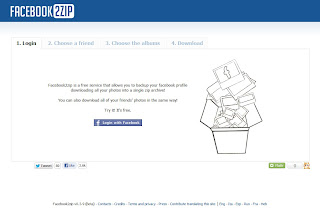
  • First u follow this website facebook2zip.com
  • Now u click on login with FACEBOOK button.
  • Go TO App or Request for permission on this website by click on allow button.

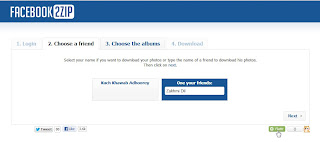
  • Now choose your friends name or type yuor friends name and then click on next buttion.
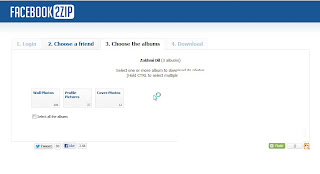
  • At this time.It will display all albums name of your friends.Just select one albums which u want to download.And after click on donload button.
That's It now u are done. And your images will be download in A ZIP file.
I hope u will u like this trick

View Your Facebook Photo on Cooliris 3D Wall

View Your Facebook Photo on Cooliris 3D Wall

Posted by Anonymous  |  at  08:31


View Facebook Photo with Cooliris 3D Wall
Cooliris is simply the fastest web image searching application that will give you the most stunning way to browse and view photos and videos from your Facebook, Instagram, and from the web on your desktop or mobile device. Cooliris provides a fast and fluid image browsing engine that enables you to discover all your photos in one place. Cooliris let you effortlessly scroll an infinite "3D Wall" of your content without having to click page to page. You will be able to seamlessly browse and share photos whether you're on Facebook, Google Images, YouTube, Flickr, Picasa, Kodak Gallery, or any supported site. Want all your Facebook friends to see select photos?
Easily share them to your Facebook Timeline!
Download free Cooliris for iPad, iPhone, iPod Touch.
Get free Cooliris  extension for Chrome.
Get free Cooliris   add-on for Firefox.
Cooliris Website

Template Powered By Blogger.| Distributed by Blogger Skiller