Showing posts with label Facebook Tricks. Show all posts

Send Colourfull alphabets in Facebook Chat

Send Colourfull alphabets in Facebook Chat

Posted by Anonymous  |  at  13:01


Asalam o Alaikum  Friends.I am Ali today i'll tell u how to post colourful alphabets in Facebook chat Now Guys you can also write message to your friend in this type of Style....COLOUR FULL letter.. Here Is the Tricks.. Copy the below code related to alphabet and paste it where u wana send......!!!

[[244961858909298]] = A [[344113652270150]] = B [[344991278847613]] = C [[164461493653696]] = D [[196752423751220]] = E [[301630573215430]] = F [[251496118250464]] = G [[266394220086654]] = H [[164866556948132]] = I [[180599335371968]] = J [[209067005843651]] = K [[238594039545396]] = L [[147702285338528]] = M [[309221402452022]] = N [[180901405340714]] = O [[246506925416551]] = P [[333343613344059]] = Q [[123128367803569]] = R [[316143388416019]] = S [[334073456605673]] = T [[199626093460643]] = U [[224202614323263]] = V [[336032459740792]] = W [[205228226232732]] = X [[142420399202282]] = Y [[157919817645224]] = Z
You can also try this Script to create codes  Facebook chate code generator

 Thanks for visiting my blog plz comment if you like my post
Share it.......

How To Know Who Unfriend You On Facebook???

How To Know Who Unfriend You On Facebook???

Posted by Anonymous  |  at  12:58


Today Facebook is the largest social networking site. Almost everyone who uses Internet are having Facebook account.Facebook so that your social networking skills could develop and you will have good online Friends.Guys remember one thing don't accept a friend request from an unknown people on Facebook cause they can be  psychic who will post abusive things on your wall or may be an hacker who will take your personal information for any destructive purpose.

How to Know Who Unfriend Us ???

So friends as we all know that Facebook does not provide information about who unfriend us and who have visited our profile ? and we all are curious to know these things because it seems to be quite annoying that someone has unfriend us so i am going to tell you the way to recognize who have unfriend / blocked us.
Follow my instrutions:-
  • 1st of all visit this site.
  • Now you are in the site.
  • Tick Here To use this servise you have to accept the Terms of Use 
  • Now it will access your facebook account.
  • Log in to u your account & press allow.
Now the site will show ur friendz and peoples who unfriends u
Thanks for visiting my blog plz comment if u like my post also share it..

How to open multiple Facebook accounts in Chrome???

How to open multiple Facebook accounts in Chrome???

Posted by Anonymous  |  at  12:44


Many peoples have too many Facebook account and but to open 3,4 or more accounts at same time is a great problem for many peoples Because to log in your many accounts you need  different browsers.
But by using this trick their is no need to download different browsers for using Facebook because Google chrome has option of add new user in which u can browse differently by making new different browser.

Follow these simple step for adding new users in Google chrome
  • Firstly download Latest version of Google chrome.
  • Then Open Google chrome and go to Settings.
  • Then Click On Add New Users at users option.
  • By using to option you can add many user.
  • It is so simple to do,  just take a look at all steps shown below.
Step : 1
 Step : 2

 Step : 3


 Finish....

Invite your all Friend on Facebook Page in Mozila Firefox by single click!!!

Invite your all Friend on Facebook Page in Mozila Firefox by single click!!!

Posted by Anonymous  |  at  12:43


  • Open Mozila Firefox.
  • Open any invitation dialog for Facebook pages, groups or events.
  • Don’t forget to check on “Search all Friends” in dialog box and scroll down until all your facebook appears.
  • Press CTRL+SHIFT+K, A window will open at the Top.
  • Paste the JavaScript code given below and hit enter.
 javascript:elms=document.getElementsByName("checkableitems[]");for (i=0;i < elms.length;i++){if (elms[i].type="checkbox" )elms[i].click()};
Check the picture below.


  •   Now wait for a minute when all friends will be selected click on send button.

This little trick must help you to save your precious time in selecting all your Friends on Facebook to invite them to like a page or join a group/event. Hope you like this tutorial. Try this to your Facebook pages and let me know if get any issue via the comment box below.

Make Multiple Facebook Accounts with Same Email

Make Multiple Facebook Accounts with Same Email

Posted by Anonymous  |  at  08:33


Assalam o Alaikum, today i am sharing a trick for Facebook.Facebook is the most famous Social Network Website, doesn't not allow multiple accounts with the same e-mail address, but it's possible to do that with a simple Gmail trick by using the same email address. This trick is caused by a small bug in Gmail because it ignores the dot (.) so the email mmmm@gmail.com is the same m.mmm@gmail.com or mmm.m@gmail.com and so on.
Steps to do this:
  • Get a gmail account, then Signup for a New Facebook account and add the dot (.) in the email address.
  • For Example :
mmmmmmm@gmail.com
mmm.mmmm@gmail.com
  • Keep changing the dot (.) position every time you want to create a new Facebook account (e.g : mmm.mmm@gmail.com )
  • Its done now...

Download Facebook albums(pics) easily

Download Facebook albums(pics) easily

Posted by Anonymous  |  at  08:32


Hi all friends . I hope u all are fine .Today i am going to share a latest FACEBOOK trick with u. Which trick help u download any FACEBOOK albums easily of your friends.
Steps :)

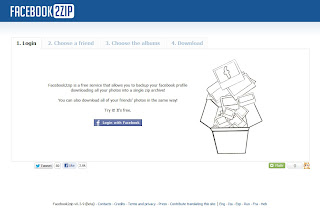
  • First u follow this website facebook2zip.com
  • Now u click on login with FACEBOOK button.
  • Go TO App or Request for permission on this website by click on allow button.

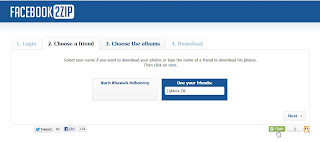
  • Now choose your friends name or type yuor friends name and then click on next buttion.
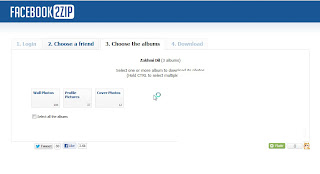
  • At this time.It will display all albums name of your friends.Just select one albums which u want to download.And after click on donload button.
That's It now u are done. And your images will be download in A ZIP file.
I hope u will u like this trick

View Your Facebook Photo on Cooliris 3D Wall

View Your Facebook Photo on Cooliris 3D Wall

Posted by Anonymous  |  at  08:31


View Facebook Photo with Cooliris 3D Wall
Cooliris is simply the fastest web image searching application that will give you the most stunning way to browse and view photos and videos from your Facebook, Instagram, and from the web on your desktop or mobile device. Cooliris provides a fast and fluid image browsing engine that enables you to discover all your photos in one place. Cooliris let you effortlessly scroll an infinite "3D Wall" of your content without having to click page to page. You will be able to seamlessly browse and share photos whether you're on Facebook, Google Images, YouTube, Flickr, Picasa, Kodak Gallery, or any supported site. Want all your Facebook friends to see select photos?
Easily share them to your Facebook Timeline!
Download free Cooliris for iPad, iPhone, iPod Touch.
Get free Cooliris  extension for Chrome.
Get free Cooliris   add-on for Firefox.
Cooliris Website

How To Place Facebook Chat On Firefox Sidebar???

How To Place Facebook Chat On Firefox Sidebar???

Posted by Anonymous  |  at  08:27


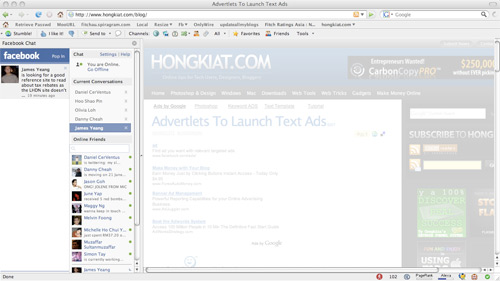
Facebook Chat is cool, at least it allows you to send instant messages to online Facebook contacts.If you are using Firefox, you can place the Facebook Chat at the sidebar.
  • Look for Bookmarks on the top navigation. Select Organize Bookmarks…
  • Click New Bookmark... tab and enter the following: 
  • Name: Facebook Chat
  • Location: http://www.facebook.com/presence/popout.php 
  • Check Load this bookmark in sidebar.

  • Launch the Firefox sidebar, click Facebook Chat and start chatting with your Facebook contacts within Firefox.

How to Get Email ids of your all Facebook Friends???

How to Get Email ids of your all Facebook Friends???

Posted by Anonymous  |  at  15:17

Get Email ids of your all Facebook Friends
If you want to know email id of your facebook friends which is hidden and not showing in your friends facebook profile so here is the trick through which you can get email addresses of your all facebook friends .
Follow Below Given Simple Steps:
  • If your facebook account is not connected with Yahoo id then first Create an email id in yahoo and connect your facebook account with yahoo Email Id .
  • Now Login to Yahoo Mail and then go to the Contacts Tab.
  • Click on Import Contatcs.
  • Now Click on Facebook
  • In Pop Up You will get Message that Do you want to Share your Contacts with Yahoo Click on OK
  • Now you will get Message
  • Thats it ! Click on View imported contacts and See you facebook friends Email Ids .

How To Post A Blank Post In Facebook?

How To Post A Blank Post In Facebook?

Posted by Anonymous  |  at  15:56

How To Post A Blank Post In Facebook.So Just Follow Belowed Simple Steps…
1. Go To Facebook Wall Post…
2. In Post Status Write The Code Given Below…

@[0:0: ]

Now Post Status…

Post Status in Blue Color at Facebook

Post Status in Blue Color at Facebook

Posted by Anonymous  |  at  15:13


Today I'm going to share how to post status in blue color at facebook. This tricks is so simple , all you need is right code.
Step 1. Copy the following code .
@[1: ]@@[1:[0:1: Your Text Here ]]
Step 2. Paste in Status

Trace Facebook Friend IP during Chat

Trace Facebook Friend IP during Chat

Posted by Anonymous  |  at  11:29


Want To Trace Someone’s  IP Address When Chat On Facebook?

Here Are The Way To Do So.

First you got to find out the IP address of that User.

To Do so we will be using “netstat” command in windows. If you want to know the IP address of a specific person on facebook or orkut or any chat service, there is only one way: Just invite or ping him for a chat and while chat is ON open ‘Command Prompt‘ on your PC (Start >Run>cmd).
Note: before trying this make sure you close all the other tabs in your browser. and only facebook is open. also if possible delete all the history and cache from your browser.
When command prompt opens Type the following command and hit Enter.
              netstat -an
And you will get all established connections IP addresses there. Note down all the suspicious IP’s

The Next Step is to Trace that user using his IP address. 

To do so we will be using IP tracer service. Go to the below address and paste the IP address in the box that says “lookup this ip or website”. and it will show you the location of the user.

It will show you all the information about that user along with his ISP and a Location in the MAP. Now in the MAP Just click on “click for big ip address location” in the big picture you can actually zoom in. and try to recognize the area. If any serious matter just note down the ISP details in that page and contact them about the IP. they will respond you.
Other netstat commands:
-a Displays all connections and listening ports.
-e Displays Ethernet statistics. This may be combined with the -s option.
-n Displays addresses and port numbers in numerical form.
-p proto Shows connections for the protocol specified by proto; proto may be TCP or UDP.
-s option to display per-protocol statistics, proto may be TCP, UDP, or IP.
-r Displays the routing table.
-s Displays per-protocol statistics. By default, statistics are shown for TCP, UDP and IP; the
-p option may be used to specify a subset of the default.

How to Change Status Of Someone’s Facebook Account?

How to Change Status Of Someone’s Facebook Account?

Posted by Anonymous  |  at  21:52

Most of us know that Facebook allows us to update our status using our mobile phone. This feature is called Facebook Text. If you have Facebook Text enabled, you have to just type inthe status and send this message to “923223265? using your registered mobile phone. Facebook will automatically update your status.
IMPORTANT!! : The slave MUST have the Facebook Text feature enabled in their account , if they don’t then this will not work
So, in this Facebook hack, we will use SMSGlobal to change the status of your friend. SMSGlobal allows us to send message to any number from anyone’s number. That is, we will send Facebook a fake SMS from your friend’s registered mobile number.Facebook will think that the message has been sent by your friend and his status will be updated according to the message contents sent by us.
Steps:-
1.  Go to SMSGlobal.com and register for an account.
2.  After logging in to your account, click on “Send SMS to a Number”
3 . Enter the information as follows:
  • Send SMS To: 919232232665
  • Sender ID From: The registered mobile number of your friend.
Message: The status you want to update for your friend. Enter anything you want. It will appear as your friend’s new status.
  • Hit on Send SMS.
4. Now, Facebook will update your friend’s status to the message you have sent.

Create Killer Facebook Timeline

Create Killer Facebook Timeline

Posted by Anonymous  |  at  20:46

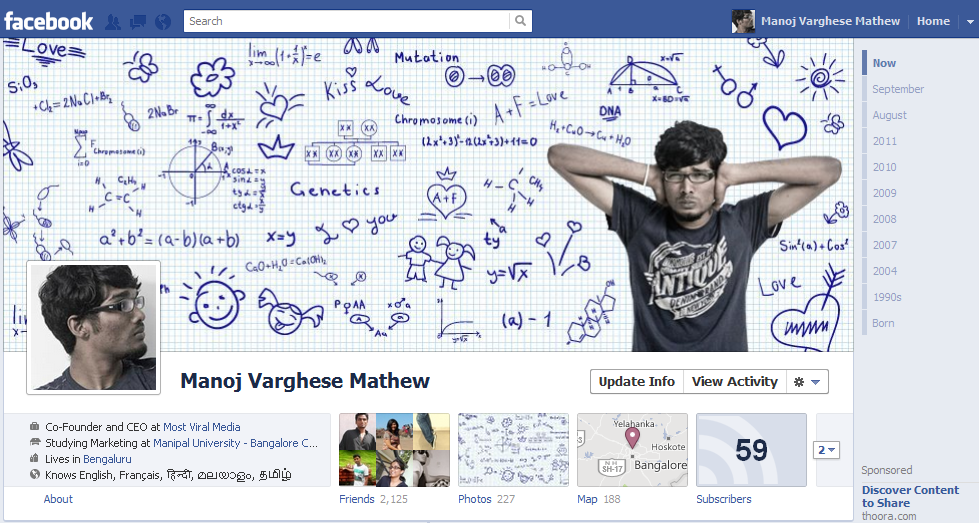
Facebook Timeline is the one way to spread a nice message or display your creative skills, making it more awesome can be a little problem for the people who are not aware of the xact sizes and other stuff for creating their own personal timeline cover.
facebook timeline cover
  • Coverize.me :- Coverize.me has a good collection of timeline covers in their database so you can just browse their website pick up the one you like and start customizing your facebook profile.
  • Cover Junction :- Cover Junction is another best place for high quality facebook timeline covers online, as said on their website Cover Junction is the place for creating, sharing and discovering high quality facebook covers online.
  • Timeline Cover Banner :- Timeline Cover Banner gives you a lot easir options for awesome customizations, you can write on the images, add some cool graphics and create collages out of your images for your facebook timeline cover. They mention that it’s the best place for creating fun and business covers online.
  • Face Coverz :- The best thing about Face Coverz is that they are providing a list of covers aranged in categories from A-Z or in any modern names like you can choose Fun and Horror :) I mean its bit simple for easier searching.
  • The Site Canvas :- This is another good one, template choosing option is there, re arrange all the images if you wanna give them a shuffle. Pretty good and simple to use.So here you go with few websites we got into our knowledge that will help you in creating a good and impressive facebook timeline cover, if you have more sites do comment below we will post those websites too updating this post and giving credit to you.

How to Post Animated GIF Images on your Facebook Wall?

How to Post Animated GIF Images on your Facebook Wall?

Posted by Anonymous  |  at  22:53


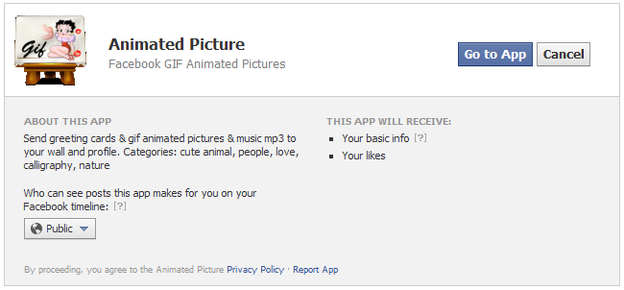
Well this post was requested by Rajiv as he just mailed me asking about how we can update our or our friends wall with a cool animated GIF Image, well I just found out that Facebook still does not allow you to upload your GIF Images directly using the photo uploading option they normally provide, but well there are some application on Facebook that enable you too post these kinds of images on your or your friends wall.With Animated-Picture for Facebook you can post animated GIF Images either using images in their own database or uploading and using your personal images through the URL option they provide. So now just check out the steps below on how you can also enjoy this awesome GIF images posting on Facebook.
Here is the full tutorial:-
  • Make sure you are signed in on Facebook and than visit the Animated-Picture Facebook Application page.
animated-picture-app
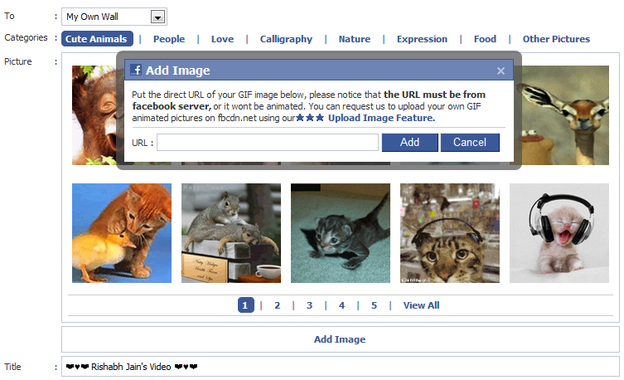
  • Now just click on the Go to App button and you will be in their interface, now you can either select images from their own database or you can put the URL of the animated GIF Image hosted somewhere else.
animated-picture-app
  • So now if you do not have any image hosted outside you can go for their images in their database divided into different categories, so you can check out images from cute animals, if you are romantic you can go for the Love and so on.
facebook-status-share
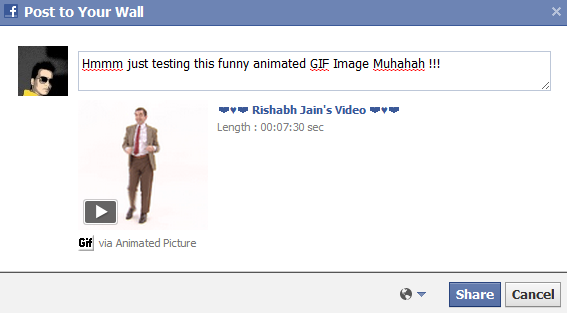
  • So now when you are done choosing your image which you are gonna share just click on it and you will a popup like above asking you too enter the title you wanna display as your status while the image animated below.
  • Now just click on share and that’s it your animated image is now live right on your wall. Well there are some images which might not work, or your friends have to click on them for the redirection well I am still finding any other good app which works more perfectly till than have fun kudos.

How to Change Background Image for Facebook Login Page?

How to Change Background Image for Facebook Login Page?

Posted by Anonymous  |  at  22:46

fb-refresh-extension

Facebook is currently the biggest online ada where people join and translate each others thoughts and communicate in many different ways by chatting, sending emoticons and sharing images, well now to make some more adjustments we have found an interesting and easy way for changing your Facebook’s login page background image. We tried to do it and applied interesting abstract flower image which you can check below.
Now as you can see in the above image we have changed the background image and style of Facebook Login Page, well now I just applied some random abstract image, you can go with any one applying your personal or with friends image on the background. So now when ever any one opens Facebook.com on your PC if will be greeted by that image with options to Log-In on Facebook.

Steps to Change FB Background Image:-

  • Make sure chrome is installed now install the FB Refresh Extension.
  • After you have installed the extension now just head over to Facebook.com and you will see that page in a new way something like above but obviously not that image, so now you have to click on the small gear icon above the Log In button.
fb-refresh-extension-settings
  • Now after you click on the small Gear Icon you will see window like above asking you to insert the image URL for the image you wanna use for the background (If you wanted to use the same image we have used in the above demo image than you can grab the link here)
  • Now you can choose if you wanna repeat the image and in which direction X for Horizontal and Y for Vertical and than just click on Save Boom, now just navigate to Facebook.com and enjoy the new fresh background.
  • If you liked this post make sure to share it will all your friends by liking and giving +1 have fun and enjoy guys :)

Awesome New Smiley Codes List for Facebook 2012

Awesome New Smiley Codes List for Facebook 2012

Posted by Anonymous  |  at  22:40


Smileys are the best way to express your mood, or what you are feeling right now without typing anything but by just showing a nice emoticon that expresses everything, well we have already posted many stuff on Facebook like and these new codes join that awesome list so check image on the right demonstrating some emoticons I just messaged to my dear friend. 

So I just grabbed all the codes and messaged to check if every emoticon was working or not and well yes every emoticon is working and is also rich in color and contrast so you will simply love using them.
So now if you like emoticons demonstrated in the image above than you should check all the codes below for using them. Now just copy any code you like and paste them in your chat than click on Enter and your emoticon will be displayed.


[[f9.laugh]]
[[f9.sad]]
[[f9.angry]]
[[f9.sleepy]]
[[f9.shock]]
[[f9.kiss]]
[[f9.inlove]]
[[f9.pizza]]
[[f9.coffee]]
[[f9.rain]]
[[f9.bomb]]
[[f9.sun]]
[[f9.heart]]
[[f9.heartbreak]]
[[f9.doctor]]
[[f9.ghost]]
[[f9.brb]]
[[f9.wine]]
[[f9.gift]]
[[f9.adore]]
[[f9.angel]]
[[f9.baloons]]
[[f9.bowl]]
[[f9.cake]]
[[f9.callme]]
[[f9.clap]]
[[f9.confused]]
[[f9.curllip]]
[[f9.devilface]]
[[f9.lying]]
[[f9.rofl]]
[[f9.billiard]]
[[f9.cakepiece]]
[[f9.rosedown]]
[[f9.shutmouth]]
[[f9.shy]]
[[f9.silly]]
[[f9.tongue1]]
[[f9.fastfood]]
[[f9.ring]]
[[f9.plate]]
[[f9.candle]]
[[f9.party]] 

So now just try using them on Facebook and enjoy with your friends and family members hope these emoticons entertain all your buddies do share this post with all of them so that they can also enjoy :)

How to Unfriend Facebook Friends in Bulk/Mass

How to Unfriend Facebook Friends in Bulk/Mass

Posted by Anonymous  |  at  21:28

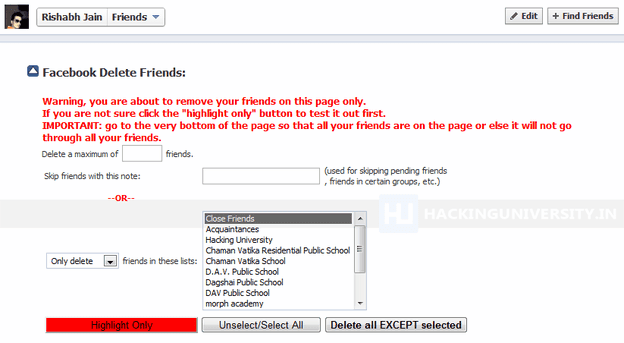
Facebook is the biggest social networking platform and you make it more by creating your heavy profile friends list. Usually in a day a person normally adds 3 to 4 friends a day and this list simply goes on well there is obviously a limit of adding 5000 friends in a profile so you cannot exceed that limit but sometimes you need someone to be added than others and removing friends in Facebook is a pretty hard deal so we found an interesting userscript which can do this job like that.FacebookDeletes is the userscript for chrome and Firefox ( well for Firefox you will needGreasemonkey installed ) which does this job really easily, just installing it and giving it a command for deleting your whole bunch of friends list.
So after you will install this userscript you just need to visit the Facebook Friends Page where you will see all your friends just click that downwards arrow like above and you will see that page like above in the image.
Now you can just click on Highlight Only which will automatically mark your friends on that page and than you can click on Delete all Except selected and than your friends will start deleting. They also have a option to delete your friends just from the groups you have created well you can figure everything when you will have that script installed.
 

Create your own Images as Emoticons for Facebook Chat

Create your own Images as Emoticons for Facebook Chat

Posted by Anonymous  |  at  17:41

Smileyti.me
Earlier we posted some awesome Mr. Bean and Jack Sparrow emoticons code for Facebook chat delivered to our inbox by Shiva Singh and today he again told us how those images can be created using a simple online website called “Smileyti.me”. Now it’s a simple image uploading and emoticon conversion website which will simply create some different codes for your images when they are complied together you get your image drawn right in front of your eyes.So now we have a created a Gif image for helping you out in uploading your image and using that website below so now just follow below steps and have fun creating your own funny images.
Steps:-
  • Just visit there website http://smileyti.me/
  • Now you will see page asking you to choose your image and than entering that irritating captcha you can follow below .gif image we created uploading our default website logo.
Smileyti.me-Image-Emoticons
  • Now after you upload your image you will get your code like below.
Smileyti.me-Code
  • Now that’s your final code, just copy this code and paste it in your Facebook chat and you will see your image rendering simply perfect.
Have fun and I hope you enjoyed this amazing article  with support of Shiva Singh, once again thanks to him for this amazing website.

Template Powered By Blogger.| Distributed by Blogger Skiller